Right-clicking a node causes a popup menu to appear. Some of the
items on the menu are intended for only a certain kind of node. Others
can be used on any node.
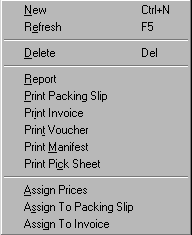
| Popup Menu Item |

Function Description |
| New |
Creates a new node of the same type of the currently selected
node. |
| Refresh |
Refreshes the contents of the node...checks with the associated
data table for the latest information. |
| Delete |
Deletes node |
| Report |
Prints a production report on boxes associated with current
node. |
| Print Packing Slip |
If current node is a packing slip, this will print out the
packing slip form. |
| Print Invoice |
If current node is an invoice, this will print out the invoice
form. |
| Print Voucher |
If current node is a farm voucher, this will print out the
voucher form. |
| Print Manifest |
If current node is a packing slip, this will print out the
shipper’s manifest form. |
| Assign prices |
Calls up the pricing dialog...lets user assign prices to the
boxes associated with the selected node based on product type.
|
| Assign To Packing Slip |
If current node is an order, this will create a new packing
slip and assign the selected order to it. |
| Assign To Invoice |
If current node is a packing slip, this will create a new invoice
and assign the selected packing slip to it. |